Disclaimer
All information shown on this page is for illustrative purposes only and should not be construed as investment, financial, market or other advice. Any information shown on this page that purports to be based upon past or current market conditions may not be complete, timely or accurate and, in any event, is not predictive of future outcomes.
Report This Indicator
(VTS ll)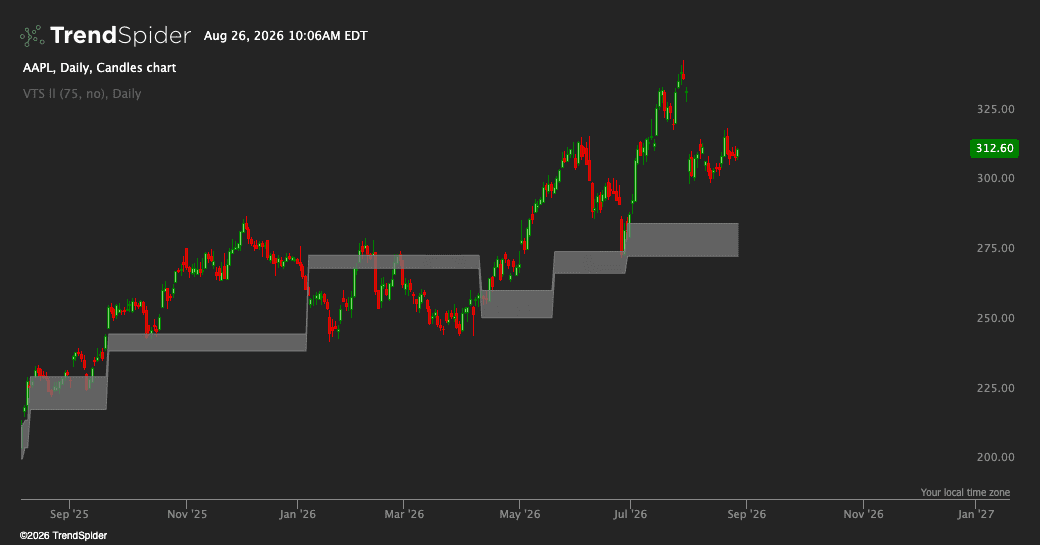
General Idea
This indicator identifies and tracks the high-low range of the bar that had the highest volume within a rolling lookback period. It continuously monitors this "volume bar range" and generates breakout/breakdown signals when price crosses above or below this range with strong volume confirmation. Think of it as dynamically tracking support and resistance levels based on where the most trading activity occurred recently.
How the Volume Bar Range Works
The indicator scans back a configurable number of bars (default 75) to find which bar had the highest volume. Once identified, it paints a shaded area representing the high and low of that specific bar on your chart. This range updates whenever a new bar takes over as the highest-volume bar in the lookback window. The shaded area appears in aqua when the range stays the same and briefly flashes white when it resets to a new volume bar.
Breakout and Breakdown Signals
The indicator generates two types of signals for use in alerts and scanners:
- Breakout Signal: Triggers when price closes above the volume bar's high with three confirmations: (1) current volume exceeds the 20-period volume average, (2) current volume is higher than the previous bar, and (3) the close is in the upper half of the current bar's range
- Breakdown Signal: Triggers when price closes below the volume bar's low with the same volume confirmations, but the close must be in the lower half of the current bar's range
These signals help identify meaningful breaks of the volume-based range rather than just any price crossing.
Usage Notes
The lookback period controls how far back the indicator searches for the highest volume bar—shorter periods make it more responsive to recent activity, while longer periods provide more stable reference ranges. The signals are designed for use in the Visual Scripts editor (scanners, alerts, strategies) and won't appear as labels on your chart.
Traders also viewed