Disclaimer
All information shown on this page is for illustrative purposes only and should not be construed as investment, financial, market or other advice. Any information shown on this page that purports to be based upon past or current market conditions may not be complete, timely or accurate and, in any event, is not predictive of future outcomes.
Report This Indicator
(Quantum Walk Probability Oscillator)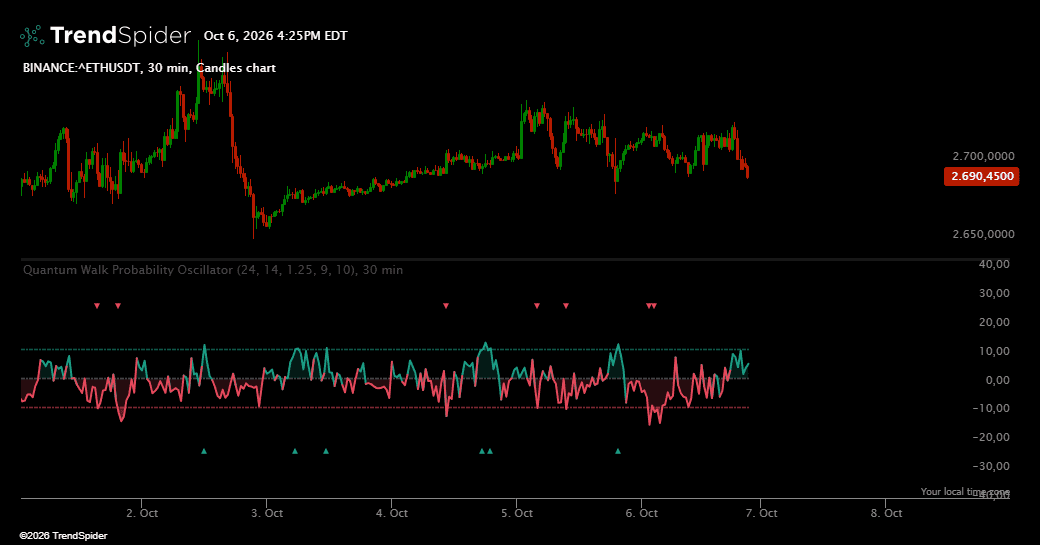
Quantum Walk Probability Oscillator looks at recent price action through the lens of a quantum random walk. Each bar's move, scaled by volatility, rotates the phase of a walker that steps up and down a lattice. Because quantum walks interfere with themselves, some sequences of moves push the walker's probability strongly to one side while others cancel out and leave it balanced. The oscillator turns that balance into a reading of how lopsided the recent price path has become, a different lens from classic momentum tools.
A smoothed expectation wave carries the main message, and the raw reading, the walker's probability mass and its coherence are available as optional lines for deeper study. It works on stocks, ETFs, indices, futures, forex and crypto, on any timeframe.
🔹 Key Features
Expectation Wave
The main wave shows the smoothed difference between the probability that the walker ended above its starting point and the probability that it ended below. It is shaded in the positive color above zero and in the negative color below zero.
State Zones
When the wave pushes beyond the threshold, the part outside is shaded more deeply, so positive and negative states stand out at a glance.
Optional Detail Lines
The unsmoothed reading, the probability mass above and below the origin and the coherence of the walk can be switched on from the legend for a closer look, without crowding the default view.
State Marks
Triangles on the rails above and below the oscillator mark the bars where the smoothed wave crosses the threshold into a positive or negative state. Marks sit outside the wave so they never cover the data.
No Repainting
Every value is computed from the bars inside its own window and never changes afterwards.
Settings
Walk Depth sets how many bars the walk uses, Volatility Length and Phase Sensitivity control how strongly each move rotates the walker, Smoothing shapes the main wave and Threshold Level sets the state boundary. Probability mass lines and state marks can be toggled, and both colors can be changed.
Built In Signals
Positive State, Negative State, Positive State Active and Negative State Active are available for alerts, scanners and strategies.
Traders also viewed
![Screenshot of PSAR Laboratory [DAFE] indicator](https://d2nbxczldlxikh.cloudfront.net/11309379epb2.png)