
Best TradingView Alternative in 2026
TradingView built its reputation as the go-to charting platform, and for a lot of traders it still earns that reputation on day one. The charting interface is clean and browser-based, the Pine Script community has published over 100,000 free indicators, and the entry tier is accessible enough that most traders never question whether they should be somewhere else.
The question usually comes later. When strategy alerts drift out-of-sync. When you want to scan for setups across your watchlist in real-time. When you open a third tab to check a daily RSI reading while watching a 5-minute chart. When automating an entry means writing the strategy in Pine Script, routing webhooks to a third-party execution service, and maintaining the connection between them.
That’s the ceiling. This article breaks down where TrendSpider is the direct upgrade for systematic active traders, and where TC2000, ThinkorSwim, and NinjaTrader fit for traders with more specialized needs.
Is TradingView Worth It in 2026?
To understand where alternatives earn their place, it helps to be clear about what TradingView actually does well and where it consistently asks its users to solve problems somewhere else.
What TradingView Gets Right
Global instrument coverage that genuinely stands out. TradingView connects to over 3 million instruments across data partners worldwide. For traders tracking international equities, crypto, forex, and US markets simultaneously, that breadth is real. The browser-based interface loads fast, requires no installation, and works across every device.
A community indicator library unlike anything else. Over 100,000 publicly available Pine Script indicators mean most standard setups, VWAP variations, anchored volume profiles, custom oscillators, session volume, are already built and free to use. For traders who don’t code, this library is a genuine time-saver.
Bar Replay and Paper Trading are well-executed. Bar Replay lets you step through historical price data at variable speeds, testing entries against how things unfolded. Paper trading simulates live execution across stocks, crypto, forex, and futures with customizable leverage and account settings. Both tools work as advertised.
The social layer is a legitimate learning resource. Chart sharing, idea streams, and community scripts let traders see not just what others are trading, but how they structure their analysis. For traders still developing their approach, this context has real value.
These are TradingView’s genuine strengths. They’re also, notably, strengths that TrendSpider matches or surpasses in most areas, while adding an entire layer of capability TradingView simply doesn’t have.
Where TradingView Falls Short for Active Traders
Real-time US exchange data is a paid add-on on every plan. NASDAQ, NYSE, NYSE ARCA, and CME real-time feeds all cost extra beyond the subscription price, regardless of tier. This is the most underemphasized part of TradingView’s pricing structure, and the most common complaint from traders who discover it at setup rather than at signup.
The intraday toolkit that day traders actually need requires Premium. Volume footprint charts, auto chart pattern recognition, second-based intervals for scalpers, TPO market profile, and multi-condition alerts are all locked to Premium and above. A trader on Essential or Plus has a charting interface, not a day trading platform.
Alerts expire on Essential and Plus. Active alerts lapse after approximately two months on both lower tiers. For traders running systematic setups across large watchlists, that’s a recurring administrative task that has nothing to do with trading. Premium removes the limit, but upgrading still doesn’t add automation.
Complex scanning hits a wall fast. TradingView’s screener offers 400+ filter fields across multiple timeframes, but you’re limited to what TradingView built into the screener UI. Combining a 15-minute RSI crossover with a daily moving average condition and a volume multiple in a single query isn’t a filter you build in the screener, it’s a workflow that requires multiple separate scans, manual cross-referencing, or jumping out to an external tool. Pine Script powers indicators and strategies on TradingView, not the screener. There’s no visual builder, no plain-language input, no code path into the screener at all.
No native automation. TradingView supports outbound webhook notifications, so a Pine Script alert can trigger a third-party execution service like SignalStack or similar. What it doesn’t offer is a native, no-code path from setup to deployed bot. Position sizing logic, automated exit management, and the workflow that ties them together all live outside the platform. Any automation requires Pine Script knowledge, a third-party service, and the connection between them.
The pattern is consistent across every tier: TradingView hands you the charting layer and asks you to solve everything else somewhere else. That’s the ceiling, and TrendSpider was built specifically to eliminate it.
TrendSpider vs TradingView: Where TrendSpider Wins
Most TradingView users have built a stack around the platform’s limitations without fully realizing it. A scanner tab open somewhere else. A backtesting tool that requires Pine Script. A broker platform they jump to when it’s time to execute. A spreadsheet tracking backtest results by hand.
TrendSpider collapses that entire stack into one subscription. Charting, multi-timeframe scanning, no-code backtesting, an AI assistant that reads your actual charts, condition-based alerts that never expire on a reset cycle, and position-aware bots that manage the full trade lifecycle through broker integrations. Eight years of development, 20,000+ active traders, a 4.8 on TrustPilot, 4.6 on Capterra, and an A rating from the Better Business Bureau.
Here is the complete comparison.
Multi-Timeframe Analysis: TrendSpider vs TradingView
TradingView’s default chart shows one timeframe. Multi-chart layouts are available on Premium and Ultimate, but each chart is its own canvas, separate indicators, separate drawings, separate analysis. Seeing how a 5-minute setup relates to a daily level still means jumping between charts, manually comparing levels, and reconstructing the relationship by eye.
TrendSpider addresses this through two distinct features that are worth distinguishing.
TrendSpider’s automated trendline detection draws trendlines, Fibonacci retracements, and dynamic support and resistance zones directly on your chart, updating in real time as price moves. No manual drawing. No redrawing when a level breaks. Confluence zones, where multiple trendlines or Fibonacci levels converge at the same price, surface automatically rather than requiring manual cross-referencing.
Multi-Timeframe Analysis (MTFA) is a separate overlay feature that plots higher-timeframe indicators and patterns onto a lower-timeframe chart. The 5-minute setup sitting at a daily level that is also held as support on the weekly is visible in a single view, not reconstructed across three separate tabs.

Best Stock Scanner for Active Traders: TrendSpider vs TradingView
TradingView’s screener runs on pre-set filter fields and basic combinatorial logic. It covers the common stuff — price, volume, market cap, basic indicator values — but you’re limited to what TradingView built into the screener UI. Pine Script powers indicators and strategies on TradingView, not the screener. If the filter you need isn’t a pre-set option, you don’t have it, and you can’t code your way around it.
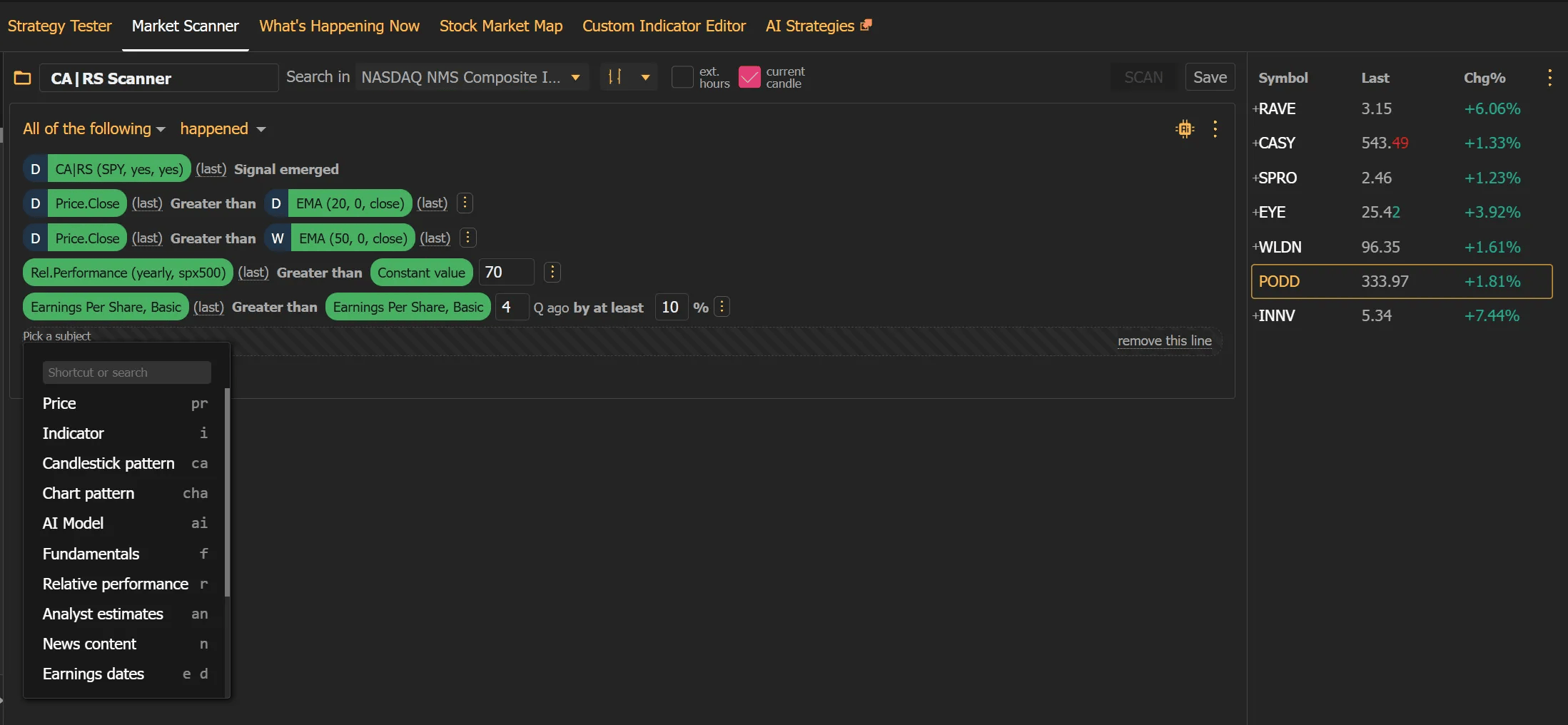
TrendSpider’s market scanner accepts plain-English input directly. Type: “stocks gapping up more than 3% on twice their average volume, with the 1-hour RSI above 60 while the daily 50-period moving average is trending above the 200-period”, and the scanner converts it into live conditions without a single line of code. For queries too open-ended to specify, Sidekick handles it: the AI agent interprets the request, builds the scan, runs it, and refines the results.
Scanner conditions span technicals, fundamentals, pattern recognition, candlestick formations, and earnings and dividend events, all combinable in a single query. Alternative data signals, options flow, dark pool prints, insider filings, live in the What’s Happening Now panel, giving traders a real-time view of institutional activity alongside their scan results.
700+ pre-built Smart Watch Lists cover the most common systematic setups out of the box. Scheduled scanners deliver results to your inbox before the session opens. Scanning granularity scales by plan, with higher tiers running on shorter intervals down to 1-minute. Charting on every plan supports timeframes from 1-minute up through weekly.
TradingView’s screener limits you to its pre-set filter library. TrendSpider’s scanner lets you describe any setup in plain English and runs it across multiple timeframes in real time.
AI Trading Assistant: TrendSpider Sidekick vs TradingView Chart Copilot
This year, TradingView launched Chart Copilot, a Chrome extension in public beta that lives in the browser’s side panel alongside your charts. It provides technical breakdowns, sets alerts at identified levels, pulls news and earnings data to explain price moves, and scans pre-built watchlists for setups. For traders who want conversational access to their charts inside TradingView’s ecosystem, it works.
The constraints matter. Chart Copilot is a Chromium-browser extension, not a native feature. Usage limits scale by TradingView plan and reset weekly. Pine Script generation is gated to Essential and above, free and Plus users can chat but cannot generate code. It doesn’t run backtests, place trades, or train ML models.
Sidekick operates differently. It’s a native, agentic AI assistant powered by Anthropic’s Claude by default, with Google’s Gemini and OpenAI’s ChatGPT available on higher tiers. The distinction isn’t that it answers questions better, it’s that Sidekick takes actions. It writes custom JavaScript indicators from plain-English descriptions and saves them to your library, builds multi-condition scans and runs them live, sets alerts across full watchlists in one workflow, and chains multi-step tasks that would otherwise take 20 minutes of manual navigation. All with full visibility into your open charts, indicators, drawings, watchlists, and backtest history.
Every TrendSpider plan includes 25 Sidekick messages per month.
The AI Strategy Lab goes further still: train Naive Bayes, Logistic Regression, K-Nearest Neighbors, or Random Forest models on your own historical data and deploy the resulting signals across charts, scanners, alerts, and automated bots. TradingView has no equivalent at any tier or extension.
Condition-Based Alerts: TrendSpider vs TradingView
TradingView’s alerts work, but every tier has a wall you hit. Multi-condition alerts that combine price action, drawing tools, and custom indicator logic require Premium. Alerts on Essential and Plus expire after about two months, so traders running systematic setups reset them constantly.
TrendSpider’s alert system is built for systematic, high-frequency alert usage.
Alerts trigger on real technical conditions: a trendline touch, an indicator crossover, a volume threshold breach, or a multi-timeframe confluence condition met simultaneously. Multi-factor alerts combine several conditions into a single trigger, the alert fires only when the full setup is present, filtering out noise from partial conditions.
Alert capacity and duration scale by plan:
- Standard: 10 alerts, 30-day duration
- Premium: 50 alerts, 90-day duration
- Enhanced: 100 alerts, 180-day duration
- Advanced: 400 alerts, 365-day duration.
All alerts run on TrendSpider’s cloud and stay active when your browser is closed. Delivery covers email, SMS, push notification, and webhook to brokerages via SignalStack or compatible integrations.
No-code Strategy Bots extend alerts into position-aware trade management. Define entry conditions, position sizing, and exit rules visually, then deploy as cloud-based bots. TradingView’s webhooks fire a single notification with no position tracking. TrendSpider’s Strategy Bots fire position-aware webhooks that route to your broker through SignalStack or compatible integrations, tracking the full trade lifecycle — entries, stops, exits, and position state — automatically.
No-Code Backtesting: TrendSpider Strategy Tester vs TradingView
TradingView’s backtesting runs through Pine Script. Writing the strategy, configuring the test parameters, and interpreting the output all require fluency in the language. For traders who don’t code, TradingView’s backtesting is out of reach without learning Pine Script first or hiring someone who already has.
TrendSpider’s Strategy Tester requires no code at any point. Build the strategy in a visual logic builder, set the parameters, and run it against any window of TrendSpider’s 50+ year archive. Each backtest returns Sharpe ratio, Sortino ratio, win rate, reward-to-risk ratio, maximum drawdown, a complete trade-by-trade log, and an equity curve. The KPI table flags structural problems with Go/No Go indicators before you commit time to a flawed setup. The Price Behavior Explorer lets you step through every individual trade to see exactly what price action looked like around each signal — the entry context, the exit trigger, and the market conditions surrounding both.
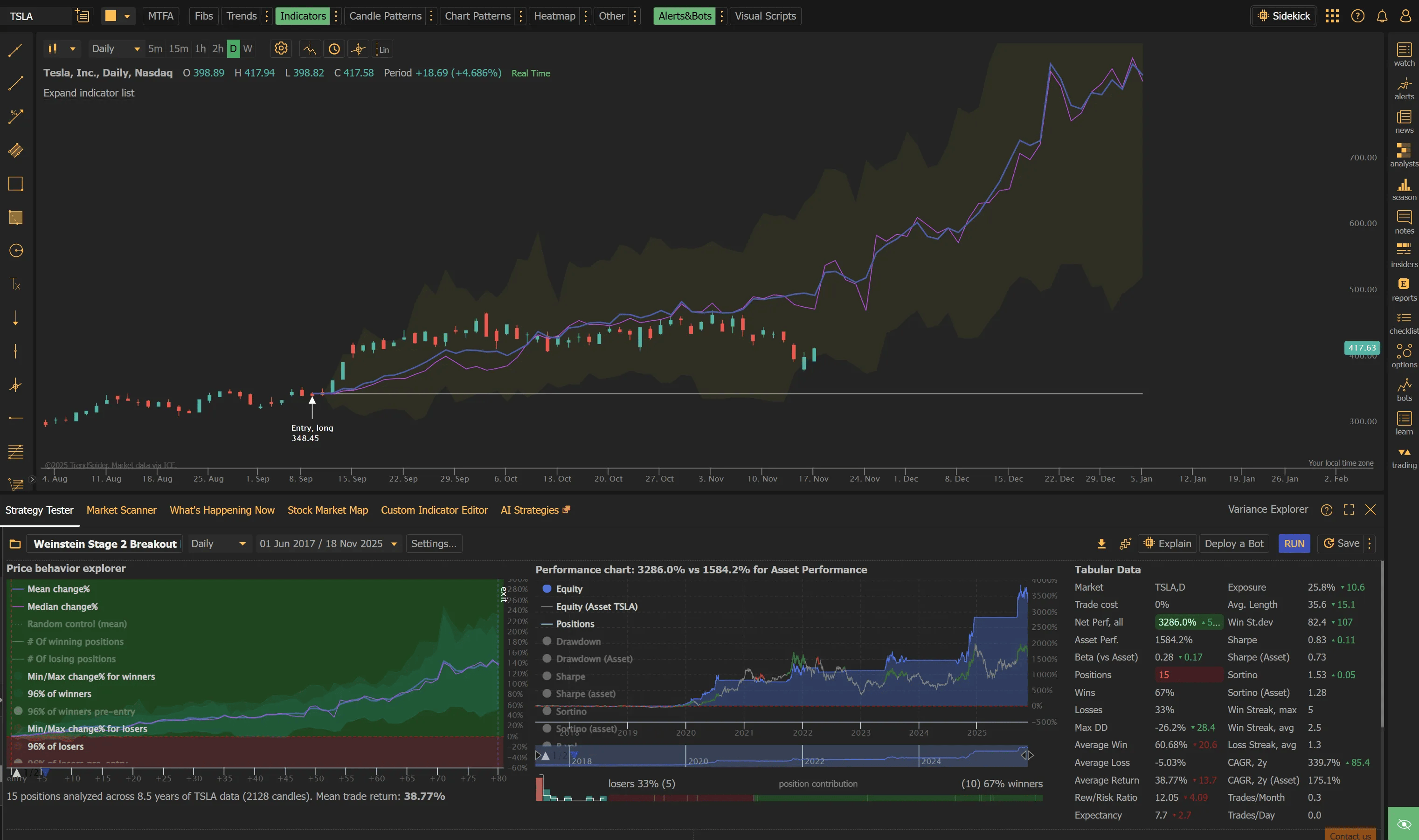
Strategies can incorporate a second symbol as a market-regime filter. Build an NVDA setup that only fires when SPY is above its 50-day moving average, the regime filter runs inside the backtest without a separate pre-screen. Any validated strategy deploys as a live Strategy Bot in a few clicks.
The AI Strategy Lab extends backtesting into machine learning territory: train classification models (Naive Bayes, Logistic Regression, K-Nearest Neighbors, Random Forest) on your historical data and validate them with the same Strategy Tester engine. TradingView has no equivalent at any tier.
Other Charting Platforms Worth Evaluating
TC2000 is a serious technical scanning platform for US equity traders. The Condition Wizard builds multi-condition scan logic without code, and EasyScan handles 240+ indicators and 129+ fundamental data points. Real-time scanning requires the Platinum tier. No crypto, no futures, no global instruments. Desktop-first with Mac support through Parallels or the web platform. No AI layer at any tier. For traders whose universe is purely US equities and who don’t need AI, it competes on scanning.
ThinkorSwim is free with a Schwab brokerage account. The platform is professionally built with the Sizzle Index, Side-by-Side Risk Profile, and 400+ technical studies. At zero platform cost with a Schwab account, it’s one of the strongest free options available to retail traders. Advanced scanning, custom indicators, and strategy backtesting require ThinkScript. No native bots or no-code automation. Best for options traders who want institutional-grade analytics without paying for a platform.
NinjaTrader is purpose-built for futures trading. The DOM ladder, order flow tools, and volume profile analytics are built for tick-level execution. NinjaTrader is free for charting and simulation, with a lifetime license available for unlimited live trading or monthly lease pricing. Commissions on futures contracts scale with volume. Limited outside of futures. Best for futures scalpers who prioritize order flow analysis over breadth.
Who Should Stay on TradingView
TradingView is genuinely the right platform for specific trader profiles, and it’s worth being honest about where that line sits.
Discretionary chartists who rely on the community script library have a real reason to stay. The 100,000+ Pine Script indicators represent years of community development, and if your process is built around specific indicators you can’t find elsewhere, TradingView is where that library lives. Chart Copilot also makes this environment more interactive for traders who want conversational access to their charts without switching platforms.
International single-stock traders are better served by TradingView’s breadth. TrendSpider is stronger on US-listed multi-asset coverage — stocks, options, futures, forex, and crypto in a single query. TradingView is broader on international single-stock charting across exchanges like NSE India, LSE, TSX, and HKEX. If your edge lives in international equities, that matters.
Traders building their approach through the social layer, following idea streams, studying shared chart setups, learning how others structure analysis, rely on something TrendSpider doesn’t replicate. That context has real value at the right stage of development.
For traders who have outgrown any of those constraints, who run systematic setups, scan across multiple conditions, want automation without code, or need an AI assistant that acts rather than just answers — TrendSpider is the more complete platform.
TradingView Alternatives: Pricing & Feature Comparison
Pricing verified May 2026. Confirm current rates at each platform’s pricing page before subscribing.
| Platform | Pricing | Key Feature | Best Use Case |
| TrendSpider | From $52/mo | Multi-timeframe scanner with no-code backtesting and AI | Active traders who want scanning, backtesting, and AI in one subscription |
| TradingView | From $13/mo | 100K+ community indicators with global instrument coverage | Discretionary chartists who rely on community scripts and multi-asset data |
| TC2000 | From $42/mo | EasyScan point-and-click scan builder with direct broker execution | US equity traders who want no-code scanning without multi-asset coverage |
| ThinkorSwim | Free | Professional-grade options analytics at zero platform cost | Options traders running discretionary or ThinkScript-based strategies |
| NinjaTrader | Free–$1,499 lifetime | DOM and order flow tools with volume-tiered futures commissions | Futures scalpers who prioritize order flow analysis |
How to Switch from TradingView to TrendSpider
Both platforms are browser-based, so there’s no installation on either side and nothing to configure before you can start. TradingView watchlists export as CSV and import directly into TrendSpider’s watchlist builder in a few minutes. That part of the migration is mechanical.
The indicator question is where most traders pause, and it’s less of a barrier than it looks. TrendSpider’s 400+ built-in studies cover the majority of what TradingView users run day-to-day without any translation. For the custom Pine Script logic you actually rely on, describe what it does in plain English to Sidekick — “a momentum oscillator that accounts for volatility contraction when identifying oversold conditions” — and it generates the equivalent JavaScript, saves it to your indicator library, and plots it on your chart. No rewriting, no intermediary steps.
Rebuild your alerts before anything else. They’re the piece that makes the platform feel real, and once they’re running on TrendSpider’s cloud and triggering on actual technical conditions, staying active when your browser is closed, without the two-month expiration cycle on TradingView’s lower tiers. Now the gap between the two platforms becomes tangible rather than theoretical. Run both in parallel for the first week before cutting over.
The structural shift is worth naming directly: TradingView is a charting environment. TrendSpider is an integrated platform where the chart, scanner, strategy tester, alert engine, and bots all communicate inside one interface.
Every plan includes a free onboarding session, and using it in the first week rather than exploring cold is the single thing that compresses that adjustment most. It surfaces the parts of the platform that would otherwise take weeks to find on your own.
Bottom Line: The Best TradingView Alternative in 2026
TradingView is where most traders start. It’s a capable charting platform with a large community, an accessible entry point, and, with the April 2026 launch of Chart Copilot, an increasingly useful AI layer for conversational chart interaction. There’s nothing wrong with starting there, and there are traders for whom it remains the right long-term home.
For traders who’ve outgrown manual charting, hit an expiring alert, wanted a scan that didn’t require code, or thought about automating an entry, TrendSpider is the more complete platform. It matches TradingView on charting and US multi-asset coverage, and adds multi-timeframe automation, plain-English scanning, no-code backtesting, an AI assistant that takes actions rather than just answering questions, and position-aware bots that route to your broker through SignalStack or compatible integrations. One subscription, no stack-stitching, no workarounds. The $19 14-day trial is the fastest way to find out if it replaces what you’re currently running.
Frequently Asked Questions
Is There Any Alternative to TradingView for Day Trading?
TrendSpider, ThinkorSwim, and TC2000 are the most actively used alternatives. TrendSpider is the strongest choice for active traders: plain-English multi-timeframe scans without code, condition-based alerts, and no-code backtesting against decades of historical data. ThinkorSwim is the strongest free option with a Schwab account; TC2000 is built for US equity scanning.
Who Is TradingView’s Biggest Competitor?
TrendSpider is the closest competitor to TradingView for active traders, differentiating on multi-timeframe scanning in a single query, automated trendline detection, and no-code backtesting — none of which TradingView supports natively. TC2000 competes for US equity traders; ThinkorSwim competes on cost through Schwab.
Is TradingView good for day trading?
Yes, for discretionary traders who chart manually and rely on community indicators. Where it falls short: the screener is limited to TradingView’s pre-set filter fields with no path to extend it through Pine Script, multi-timeframe scanning requires multiple separate queries, and the full intraday toolkit, volume footprint, auto patterns, second-based intervals, requires Premium.
When is TradingView still the right choice in 2026?
TradingView is still the right call if your process is primarily discretionary, you’re trading one or two instruments, and the community script library is part of how you develop your approach. The global instrument coverage and mobile experience also make it a useful secondary tool even for traders who switch primary platforms for systematic work.
How does TradingView’s Chart Copilot compare to TrendSpider’s Sidekick?
Chart Copilot, launched in public beta on April 2, 2026, is a Chrome extension that lets you ask questions about your charts, set alerts at identified levels, and pull news and fundamental data, all through a side panel in your browser. It’s a solid research assistant scoped to chart interpretation and lightweight management within TradingView’s ecosystem.
Sidekick operates differently. It’s a native, agentic AI assistant that takes actions: writing custom indicators and saving them to your library, building multi-condition scans and running them live, setting alerts across a full watchlist in one workflow, and chaining multi-step tasks that would otherwise require 20 minutes of manual platform work.


