


Until now, turning an idea into an automated trading strategy meant hiring a quant, or becoming one yourself. Thanks to AI, that era is over. Ask Sidekick for a strategy, as vague or as specific as you want, and it builds the rules, backtests it, and gives you a strategy you can deploy as an automated bot, or use for manual entry and exit alerts.
Try any plan for $7.
Or subscribe now: yearly plans from $32.92/mo.
View pricing options Offer ends Sunday, November 15 at 11:59pm CTin bonus tools, free with any plan
5 months of Sidekick Plus + 5 months of SignalStack Pro
Building Trading Strategies With Sidekick AI
Ask Sidekick something as simple as when to buy and sell, or get as specific as a 15-minute mean reversion bot on your favorite stock. Either way, it builds a backtested strategy anybody can understand. Sidekick isn't a generic chatbot bolted onto a charting platform. It's built to think like a trader. It hunts for edges, tests entry and exit ideas, and keeps refining until it finds something that holds up in the backtest. Want a day trading bot, a momentum swing strategy, or for Sidekick to figure out the whole approach for you? All it takes is a message.
Here's what makes this different from just chatting with an AI about your trades:
- Nothing is hidden. You see the exact entry and exit rules Sidekick tested, not just a final answer handed to you out of a black box.
- It's yours once it's built. A saved strategy runs natively in TrendSpider. The LLM's job is done. There's no ongoing message usage and no dependency on the AI to keep it working.
- Use it anywhere. Those rules aren't locked inside Sidekick either. Take them into the Strategy Tester, scanners, or alerts wherever they're useful.
Here are four examples so you can see it in action:
- 1-Hour AAPL Momentum Strategy: A strategy built to buy into the emerging trend and cut when price stalls.
- Sidekick's NVDA Daily Strategy: What happens when you let Sidekick figure out the whole approach for you.
- 15-Minute TQQQ Day Trading Bot: A mean-reversion day trading bot Sidekick built and backtested on TQQQ.
- 1-Hour TSLA Day Trading Strategy: A one-line day trading request that Sidekick tested, then refined on request.
How to Build an AI Trading Strategy With Sidekick
- Ask for a strategy. Open Sidekick and describe what you want on any ticker and timeframe. It can be as simple as "build me a day trading strategy for TSLA" or as specific as you need.
- Let Sidekick do the research. It designs a batch of entry ideas, backtests them, drops what doesn't work, and doubles down on the most promising ones. Then it tunes the exits based on how real trades played out.
- Review the shortlist. Sidekick hands back its top strategies with key metrics. Click any one to open it in the Strategy Tester and see the full results and exact entry and exit rules.
- Push it further. Ask Sidekick to try new exits, test the strategy on other symbols, or explain why one version beat another.
- Save your favorites. Once saved, a strategy runs natively in TrendSpider.
- Put it to work. Deploy it as a strategy bot to automate your trades, set up entry and exit alerts via SMS, email, or in-app notifications, or do both.
Sidekick Strategy Builder in Action
A few real examples of what this looks like end to end: the prompt we gave Sidekick, and a quick look at what it built.
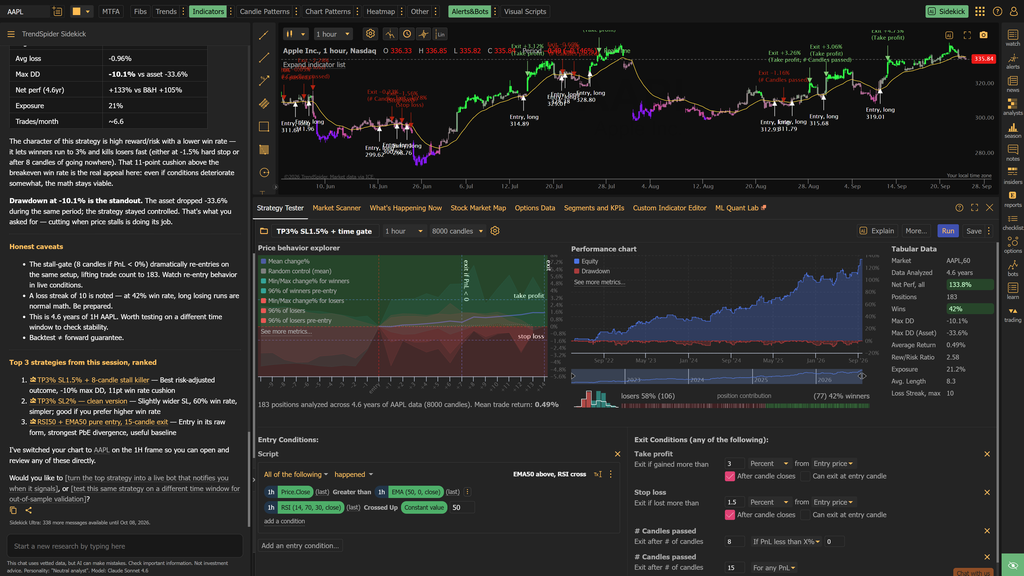
1-Hour AAPL Momentum Strategy
Prompt: "Build me a strategy that buys into the emerging trend, and cuts when price stalls on the AAPL 1-hour chart."
From there, Sidekick worked through several rounds of testing, trying different momentum-based entries and ways to detect a stalling trade, before settling on a version that captured the idea we asked for: buy the emerging trend, cut it when it stalls.
Sidekick's NVDA Daily Strategy
Prompt: "Tell me when to buy and sell on NVDA. I'm not sure what kind of strategy is good, or what timeframe, figure it out for me."
This one shows Sidekick doing more than just building on command. Instead of handing over a made-up signal, it explained why reliable buy/sell signals aren't something anyone can just hand you, and proposed testing a momentum strategy on the daily timeframe instead. After getting the go-ahead, it worked through a few rounds of testing and landed on a daily strategy it was confident in.

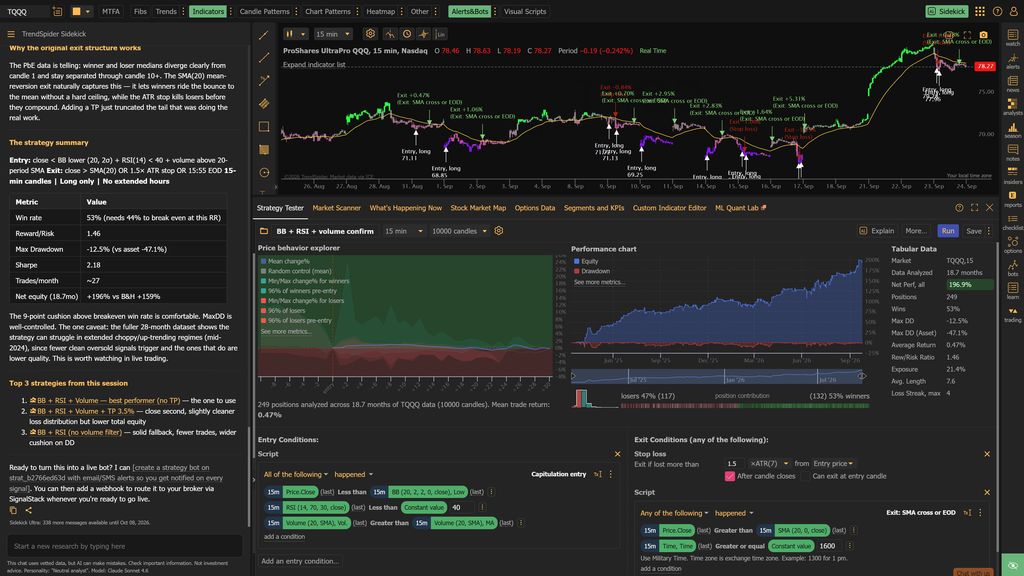
15-Minute TQQQ Day Trading Bot
Prompt: "Build me a 15-minute mean reversion day trading bot on TQQQ."
We handed Sidekick that single line and let it run. It tested a series of entry and exit combinations on its own, mean-reversion signals, volume filters, different exit rules, before landing on a version it was confident held up across the backtest.
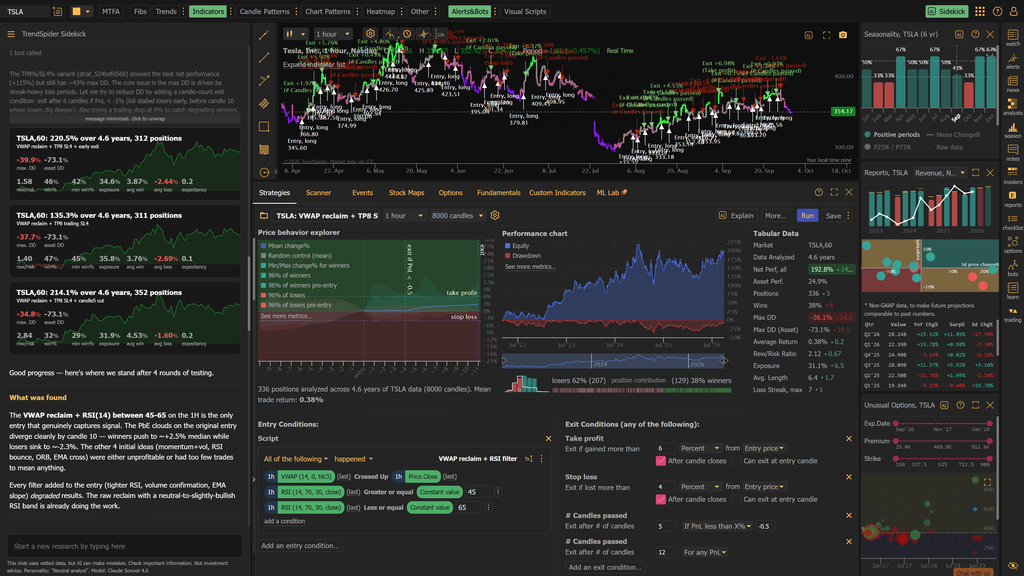
1-Hour TSLA Day Trading Strategy
Prompt: "Build me a strategy for day trading $TSLA."
Sidekick started by testing five very different day trading ideas side by side, then dropped the ones that showed no real signal and put its effort into the most promising entry. From there it added exits and came back with a shortlist of strategies. We then asked it to refine its top pick while keeping the same candle window, and it tuned the strategy to be easier to trade.
Automating the Strategy vs Setting Alerts
Once you've found a strategy you like, you have two ways to put it to work: strategy bots or alerts.
Both fire off the same backtested strategy, but strategy bots are the more advanced option. A bot is position-aware, meaning it knows whether you're already in a trade, and it runs indefinitely until you stop it or a stop condition is met. A standard alert is simpler: it just fires the moment its condition is met, and it can expire. Either one can trade for you automatically or just notify you to place the trade manually.
Strategy Bots
- Automate Your Entire Strategy: Route the bot's webhook to a platform like SignalStack (or a SignalStack alternative) to place entries and exits directly in your broker, or send it to Discord, Telegram, SMS, or email if you'd rather be notified instead of auto-executed.
- Position-Aware: Bots know if you're already in a trade, so you won't get a duplicate entry signal or miss an exit because the bot lost track of your position.
- Never Expire: Bots keep running until you manually stop them or a stop condition is met, so you never miss a trade because a setup quietly lapsed.
- The Caveat of Fully Automating: The Strategy Tester assumes you go all-in and all-out on every trade, so sizing your positions against a real, fluctuating account is a serious consideration you need to configure properly.
Alerts
- Simple, Condition-Based: Alerts fire the moment their condition is met, no position tracking behind the scenes.
- Can Expire: Unlike bots, alerts aren't built to run indefinitely, so you may need to reset or re-arm them over time.
- Good for a Lighter Touch: If you just want a heads-up when a setup fires, without the extra configuration a bot involves, alerts are the simpler path.
Neither option is strictly better. Bots do more of the work for you; alerts are lighter and simpler. Which one fits depends on how much you want the system tracking on your behalf.
Frequently Asked Questions
Do I need to know how to code?
No. Sidekick builds and backtests the strategy for you using TrendSpider's existing Strategy Tester. You describe what you want in plain English, and it handles the entry signals, exit rules, and backtesting logic. You never have to write a line of code or manually configure an indicator.
Can Sidekick execute trades automatically, or just alert me?
Both. Once Sidekick builds a strategy, you can deploy it as a strategy bot and connect it to SignalStack to place orders in your live broker automatically. If you'd rather stay hands-on, set up alerts instead and get notified of every entry and exit.
Do I have to use SignalStack to automate my strategies on TrendSpider?
No. SignalStack is a TrendSpider-owned product, but you can enter any webhook into the Strategy Tester and alerts to send entries and exits to things like Discord, Telegram, or a SignalStack alternative.
How does Sidekick backtest the strategies it generates?
Sidekick prompts the AI input box in TrendSpider's existing Strategy Tester, collects the backtest results, and then reasons over them to select the top contenders for you.
Once my strategy is built, do I need to keep using Sidekick or the AI to run it?
No. Once a strategy is built and saved, it runs natively in TrendSpider using the exact rules Sidekick found. There's no ongoing message usage and no dependency on the AI to keep it working.
Which AI models does Sidekick use?
It depends on your Sidekick plan. Free and Basic plans include Sonnet 4.6, Gemini 3.1, and GPT 5.4. Plus and Max plans add GPT 5.5 and Opus 5.0 for the most demanding research. Every TrendSpider plan includes 25 free Sidekick messages per month, and paid Sidekick plans raise your message limit and unlock more models. See the full breakdown on our pricing page.
Do backtest results guarantee future performance?
No. A backtest shows how a strategy would have performed on historical data, not how it will perform going forward. Markets change, and every strategy has losing stretches. That's exactly why Sidekick tests so many variations and shows you the full metrics, including drawdown and win rate, so you can judge how a strategy held up before you ever put money behind it.
Try the Sidekick AI Strategy Builder Today
Stop staring at a blank chart trying to figure out where to start. Ask Sidekick for a strategy, and let it build, backtest, and rank the options for you.
Open TrendSpider


